Genogram maker: make a genogram in minutes
- Free
- No account
- PDF, PNG, SVG
What is a genogram maker?
A genogram maker is a tool for drawing a family diagram across three or more generations with standard symbols: squares and circles for people, lines for marriages, divorces and children, and colored lines for emotional relationships, so a therapist, social worker or student can see a whole family on one page.
Genogram Pro (genogram.pro) is a free web genogram maker that builds the diagram from a plain-language description or person by person with standard McGoldrick symbols, lays it out automatically and keeps it in your browser, with no account needed.
How to make a genogram in three steps
You can create a genogram here in a few minutes, on a computer or a phone, with no account. To make a genogram online with this genogram maker:
- Describe the family or add people. Type who is in the family into the AI chat of the editor above (the Chat button opens it) and press Send. Or open the full-screen editor and add people one by one: select someone, then add a partner, a child, parents or a sibling.
- Answer the questions and fix the details. If the AI asks which person you meant, pick an option. Then correct anything with a sentence in the chat, such as “Anna and Igor divorced in 2021”, or by hand: open a person’s card, or drag someone to a new place.
- Export PDF, PNG or SVG. The file can carry a key of the symbols used, a title, the date and, if you add it, your name, ready for a case file or an assignment.
For a longer walk-through, with how to draw each part by hand as well, read the step-by-step guide to making a genogram.
Genogram AI: describe the family, the AI drafts it
The AI here is a chat inside the editor. Describe the family in plain words and it drafts the whole genogram in one step: the people, couples, children and relationships you mention. It is an AI genogram generator that works with the editor, not instead of it: our engine still lays out and draws the diagram, and you can change anything by hand.
- When a sentence is ambiguous, it asks a question with options.
- It leaves unknown years empty instead of guessing; check the draft and correct anything it got wrong.
- Each AI turn is one undo step, with a list of what changed and an “Undo this turn” button.
- Edit by sentence: “Anna and Igor divorced in 2021” or “add a daughter, Mia, born 2015”.
- Voice input, where your browser supports it.
You type
Anna (born 1990) married Igor (born 1988) in 2014. They have a son, Leo, born 2016. They divorced in 2021, and she now lives with Paul (1987). His mother Vera died in 2019.
The AI asks
Whose mother is Vera?
You choose “Igor’s mother”, and it builds the genogram. Vera’s birth year was not given, so it stays empty.
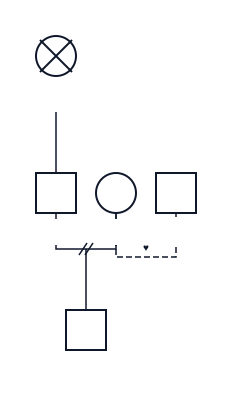
The AI chat is free with a daily limit. Chat text is sent to the AI provider named in our privacy policy, so use pseudonyms.
A layout that stays readable
In a drawing program such as Word, Visio or Canva, the layout is up to you. This genogram builder does the automatic layout itself and keeps a big family readable:
- each generation on its own row, partners side by side, siblings in birth order;
- twins drawn from one point;
- relationship lines routed around other people and their names, not through them;
- a fresh layout after every edit, while people you moved by hand keep their offset; one command, “Reset shifts”, clears all manual shifts.
To show it on a hard case, we publish an open benchmark: a fictional family across four generations with second marriages, a stepchild, an adopted and a foster child, two sets of twins, a stillbirth, a miscarriage and a pregnancy. The numbers below are our engine on this file, measured by this genogram maker when the page was built.
| Measure | What it counts | Result |
|---|---|---|
| Order rules broken | a couple drawn apart, siblings out of birth order or split, twins apart | 0 |
| Overlapping symbols or names | pairs of symbols or name labels that cover each other | 0 |
| Merged child lines | two families’ child lines running into one, so you cannot tell whose child is whose | 0 |
| Line crossings | places where couple, child or twin lines cross each other | 1 |
Draw the same family in any genogram tool and compare. Download the family as a .genogram file (it opens in our editor) or as plain text to type or paste anywhere.
Standard McGoldrick genogram symbols
The editor draws the standard genogram symbols of McGoldrick notation, the one most courses teach: a square for a male, a circle for a female, an X through someone who has died and a double outline for the index person. It supports:
- 6 life statuses: alive, deceased, pregnancy, miscarriage, stillbirth and abortion;
- 19 partner relationships, such as marriage, divorce, separation, cohabitation, engagement and an affair;
- 7 child links: biological, adopted, foster, step, surrogate, sperm donor and egg donor;
- identical and fraternal twins;
- 39 emotional relationship lines, from close and fused to conflict, distant and estranged;
- notes on any person.
Under each symbol the diagram shows the name and the years, and the age sits inside the symbol. Choose which labels to show from the Layers menu.
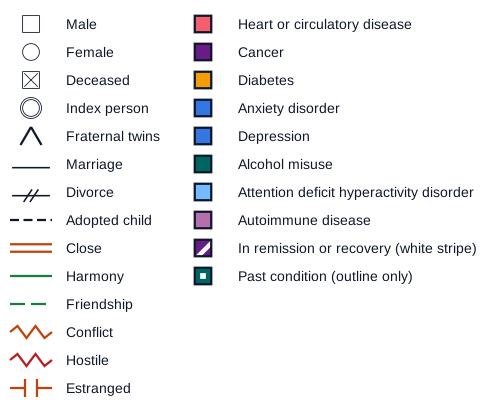
An export can add a key of only the symbols in that diagram (on by default), like this one. See all genogram symbols and line types, with a printable key.
Notation source: Monica McGoldrick, Randy Gerson and Sueli Petry, Genograms: Assessment and Treatment, 4th edition, W. W. Norton, 2020 (ISBN 9780393714043).
Export for a case file, an assignment or a slide
Save a printable genogram as a PDF, PNG or SVG file, free, with a small “Made with Genogram Pro” badge; Professional exports have none.
- Genogram PDF in vector form, downloaded as a file: text stays sharp and searchable.
- PNG at twice the screen resolution for Word or a slide; SVG for design tools.
- Letter, A4, Tabloid or A3, landscape or portrait; one page, or split across pages with an assembly map.
- A key of only the symbols on your diagram, on by default.
- A header with the title and the date, and “Prepared by” your name if you want it; an optional “Confidential” mark.
- De-identify: initials instead of names, no dates.
- Black and white for printers without color.
- A warning when a large family would print in tiny text.
The export shows a preview first, and remembers your paper, orientation and name for next time.
Where your data goes
Without the cloud your genogram stays on your device; only what you type into the AI chat, and the family it edits, is sent to the AI provider.
- No account is needed to draw: your diagrams are saved in this browser and in the .genogram files you save.
- The AI chat, if you use it, sends your message and the family it edits through our server to an AI provider (see which AI provider processes chat text). We keep no copy of the AI request, and request bodies are never logged.
- With Professional, genograms you put in the cloud are kept on our server, encrypted. It is not for identifiable client information.
- Use pseudonyms and years only for clients: no real names, addresses or contact details.
Clearing your browser’s site data deletes the diagrams stored in it, so save a file from time to time; the editor reminds you. Genogram Pro is a drawing tool: it does not interpret or diagnose.
Who uses Genogram Pro
Three groups draw most genograms, and each needs a different file at the end.
Family therapists
Draw the family at intake, often in a few sentences of the chat, add relationship lines as the work goes on, and export a PNG for a supervision slide or share your screen in a video session. See the genogram in family therapy.
Social workers
A genogram for social work case files: birth, foster, adopted and step links in one diagram, and a de-identified PDF with a “Confidential” mark. See the social work genogram. Drawing an ecomap is coming soon.
Students
A genogram assignment usually asks for three generations, a key, a title, the date and your name: the PDF can have them all, on Letter or A4. Start from a genogram template.
Example: a three-generation family
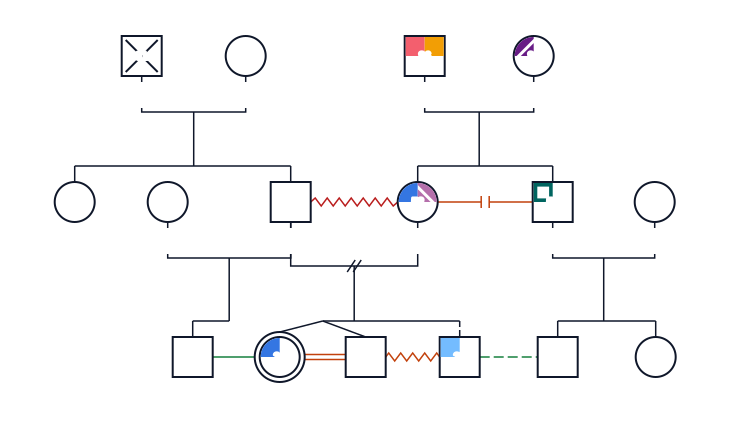
See more genogram examples with fictional families, each with a key and a PDF.
Genogram maker FAQ
Is this genogram maker free?
Yes. Genogram Pro (genogram.pro) is free to use with no account: drawing, editing, saving in your browser or to a file, and PDF, PNG and SVG export with a small “Made with Genogram Pro” badge. The AI chat is free within a daily limit. Professional adds a cloud, Unlimited AI and exports without the badge.
Do I need an account?
Not to draw. Drawing, export and the AI chat within its daily limit need no sign-up or email address: your genograms are saved in this browser, and you can save each one, or all, to a file to open in any browser. An account is needed for Professional, whose cloud keeps genograms on every device.
Can AI make a genogram?
Yes. Describe the family in plain English, for example who married whom, the children and their birth years, and the AI chat drafts the whole genogram in one step with standard symbols. When a sentence can be read two ways it asks you a question with options, and it leaves unknown years empty instead of guessing.
Where is my data stored?
Without the cloud your genogram stays in your browser and in any .genogram files you save, and only the AI chat sends your message, with the family it works on, through our server to the AI provider named in our privacy policy; request bodies are not logged. Professional adds an encrypted cloud.
Can I use it with clients?
Yes, de-identified. Use pseudonyms and years only for clients: no real names, addresses or contact details. The AI chat sends what you type, and the family it edits, to the AI provider; the Professional cloud is not for identifiable client information. Export can print initials without dates. Genogram Pro is not a HIPAA business associate and does not sign BAAs.
Does it work on a Mac, iPad or phone?
Yes. It runs in the browser on a Mac, a Windows or Linux computer, an iPad or a phone, with nothing to install. On a wide screen the editor opens right on this page, with the AI chat beside it; on a phone this page shows the example and two buttons that open the full-screen editor, which works with touch.