Social work genogram: examples, symbols and a free tool
A social work genogram is a family diagram for a case file: who belongs to the family, who cares for the child, and how they are linked by birth, foster care, adoption or kinship. This page explains the genogram in social work, shows a fictional foster care example and the symbols it uses, and how to export a de-identified copy. Draw your own social work genogram in Genogram Pro (genogram.pro), a free genogram maker, with no account.
What is a genogram in social work?
A genogram in social work is a diagram of a family across at least three generations, drawn with standard symbols. It shows the child or adult the case is about, their parents, siblings and grandparents, the couples and divorces, and which links are by birth, adoption, foster care or a step relationship. Workers use it to see who is in the family and who could help.
Social work genogram example: foster care
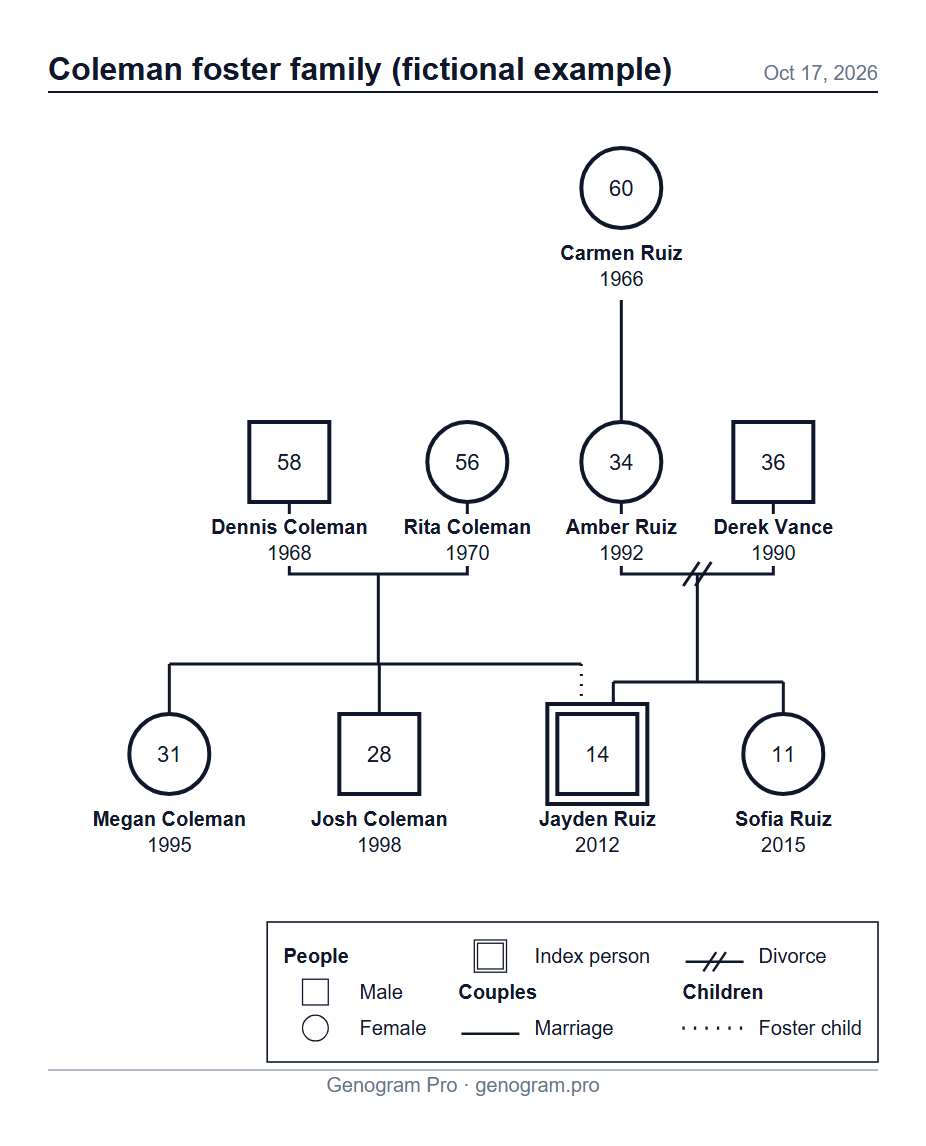
The family below is fictional. Jayden, the index person, lives with the Coleman family: the dotted line from Dennis and Rita Coleman marks a foster child. The solid line from Amber Ruiz and Derek Vance, whose couple line has two slashes for their divorce, shows his birth parents, with his younger sister Sofia. His grandmother Carmen is above his birth mother: a relative the worker might contact.
Foster care genogram
A boy in foster care, drawn in both families: a dotted line from his foster parents, whose own children sit beside him, and a solid line from his divorced birth parents, under whom his younger sister stays. His grandmother is drawn above his birth mother.
Text description of this genogram
Genogram: 9 people. Carmen Ruiz, female, born 1966. Dennis Coleman, male, born 1968. Rita Coleman, female, born 1970. Amber Ruiz, female, born 1992. Derek Vance, male, born 1990. Megan Coleman, female, born 1995. Josh Coleman, male, born 1998. Jayden Ruiz, male, born 2012, index person. Sofia Ruiz, female, born 2015. Couples: Dennis Coleman and Rita Coleman (marriage); Amber Ruiz and Derek Vance (divorce). Children: Megan Coleman (biological child of Dennis Coleman and Rita Coleman); Josh Coleman (biological child of Dennis Coleman and Rita Coleman); Jayden Ruiz (biological child of Amber Ruiz and Derek Vance); Sofia Ruiz (biological child of Amber Ruiz and Derek Vance); Jayden Ruiz (foster child of Dennis Coleman and Rita Coleman); Amber Ruiz (biological child of Carmen Ruiz).
Assessment and intake. One page shows a family that would take several paragraphs to describe, and gaps in what you know become visible.
Finding relatives. In child welfare, a genogram helps find grandparents, aunts, uncles and adult siblings who might offer a placement or support.
Case presentations and supervision. A shared screen or a printed PDF lets a team see the family in seconds, and the diagram can be updated as the meeting goes.
Court and reviews. Some agencies attach a genogram to reports; follow your agency’s format and rules for what goes in.
Not every case needs one. Many workers draw a genogram when the agency, the court or the course requires one, and that is when a fast tool helps most.
What a case file genogram needs
Three generations: the child’s grandparents, parents and siblings, plus the child’s own children if there are any.
The index person (the person the case is about) with a double outline.
Every kind of link drawn as what it is: birth, adopted, foster and step children each have their own line, and a child can be linked to birth parents and to foster or adoptive parents at once.
Couples: marriages, divorces, separations and partners living together.
Dates you know: birth and death years, drawn under each symbol with the age inside it. You can type the years of a marriage or a divorce too: the editor keeps them in the couple’s card, but the diagram does not draw them yet. Leave unknown years empty rather than guessing.
A key of the symbols used, and the date the genogram was made.
Children in care often belong to more than one family at once, and the genogram should show all of them rather than choose one.
Foster care: a dotted line from the foster parents to the child, as well as the solid line from the birth parents. The foster family’s own children sit beside the child.
Adoption: a dashed line from the adoptive parents. Keep the birth parents on the diagram if the case or the child’s story needs them.
Kinship care: when a grandmother, an aunt or another relative takes the child in, they are usually already on the genogram — add them if they are not. In the editor, select the child, press Link, choose the relative and pick “Child of”, then the foster type: a dotted line joins them. Use the Notes field for the placement details your agency asks for; notes are sent to the AI provider with the family when you use the AI chat, unless “Don’t send notes to AI” is on.
Large sibling groups and half-siblings: each couple has its own line, so half-siblings sit under the parents they share and the layout rearranges itself as you add them.
Without the cloud your genogram stays on your device; only what you type into the AI chat, and the family it edits, is sent to the AI provider. The diagram is saved in your browser and in the .genogram files you save, with no account needed. The Professional cloud is not for identifiable client information.
Use pseudonyms and years only for clients: no real names, addresses or contact details.
Turn on De-identify when you export: initials instead of names, no dates, and a plain “Genogram” title instead of the diagram’s name.
Add the optional “Confidential” mark and your name as the author.
Save a PDF on Letter or A4 for the file, or a PNG for a report.
Your agency’s rules decide what may be typed into an online tool; check them first. Genogram Pro is a drawing tool: it does not interpret or assess the family.
Genogram and ecomap together
Social workers often pair the genogram with an ecomap. The genogram shows the family through time; the ecomap shows the family now, with its ties to school, work, health care, services and friends. Read what an ecomap is, with examples. Drawing an ecomap in the editor is coming soon; today you can draw the family genogram.